
Talk to us Risks to Watch

Why can’t your Endpoint Detection and Response (EDR) Stop Malware-Free Attacks? The 82% Problem!

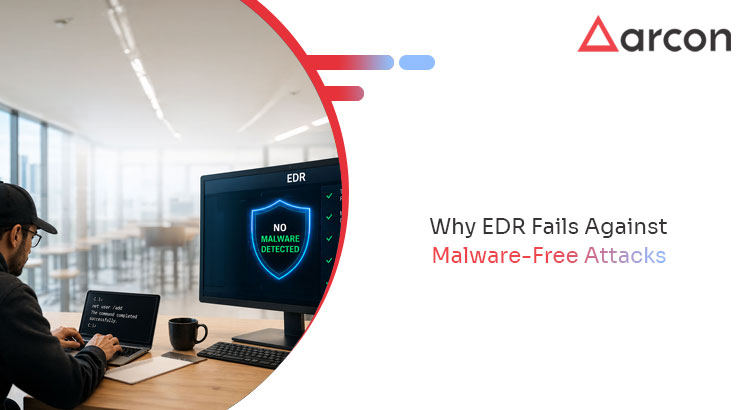
You bought EDR to catch attacks. So why do attackers keep walking past it?

The answer is uncomfortable. The modern intrusion does not look like an attack. It looks like a logged-in user running normal tools. No malware file to flag. No signature to match. Just valid credentials and trusted binaries doing exactly what they are designed to do — for the wrong person

Key Takeaways

  • 82% of detections in the last year were malware-free (CrowdStrike Global Threat Report 2026). The attacker brought no malicious file for your EDR to catch.
  • Attackers log in, they don’t break in. Valid credentials and native system tools (“living off the land”) look like legitimate activity to signature- and behavior-based endpoint tools.
  • Speed compounds the problem. Median eCrime breakout time is now 29 minutes (CrowdStrike 2026) – faster than most teams can triage an alert.
  • The missing signal is privilege. Every elevation request, denial, and anomalous admin action is data your EDR rarely reads. Behavioral analytics on privilege activity surfaces the attack that “looks normal.”
  • Prevention beats detection here. Removing standing local admin and controlling which apps can elevate shrinks the attack surface before detection ever has to fire.

The problem: the attack that brings no malware

For a decade, endpoint defense was built around a simple assumption – attacks involve malicious files, so catch the file. EDR, antivirus, and sandboxing all lean on that premise. Malware-free attacks break it: the premise no longer holds.

In the last year, 82% of detections were malware-free (CrowdStrike Global Threat Report 2026). The adversary did not drop a payload. They obtained valid credentials and used the tools already on the machine – PowerShell, WMI, native admin utilities – to move toward their objective. Security teams call this “living off the land.” To an endpoint tool watching for malicious files, it is nearly invisible.

The credential economy makes this easy. Credential abuse appeared in 39% of breaches across the full attack chain (Verizon DBIR 2025), and compromised credentials were the most common initial attack vector studied in the IBM Cost of a Data Breach Report 2024. Worse, the tools meant to stop this are already being bypassed: 40% of infostealer infections in the last year hit endpoints that already ran EDR or antivirus (Verizon DBIR 2026).

Then there is speed. Median eCrime breakout time – from first foothold to lateral movement – has collapsed to 29 minutes (CrowdStrike Global Threat Report 2026). A defense model that depends on a human seeing an alert, deciding it is real, and responding is racing a clock it cannot win.

Why detection alone fails against malware-free attacks

Detection is reactive by design. It assumes three things: that there is something malicious to detect, that it is distinguishable from normal activity, and that there is time to act before damage is done. Malware-free attacks – credential-driven and often complete inside 29 minutes – break all three.

  • Nothing malicious to flag. A valid login and a native binary are not anomalies to a file-focused tool.
  • No clean signal. When the attacker is the authenticated user, “legitimate” and “malicious” look identical at the file layer.
  • No time. Even a correct alert often arrives after lateral movement has begun.

This is not a reason to remove EDR. It is a reason to stop treating it as the whole strategy. The layer most endpoint programs are missing is the one that reads privilege – not files.

Why detection alone fails against malware-free attacks

Here is what a file-watching tool cannot see, but a privilege-aware one can: the pattern of elevation.

Every time a user requests admin rights, every time an elevation is denied, every time an account suddenly tries to run a privileged action it has never run before – that is a signal. Individually, each looks mundane. In aggregate, anomalies in privilege behavior are one of the clearest early indicators of a compromised account or an insider probing for access.

This is the third pillar of Endpoint Privilege Management, and the one most programs ignore. In Gartner’s framing of the privileged access market, endpoint-native privilege control (PEDM) sits alongside account vaulting as a core capability – yet most teams deploy only its policy half. EPM is often reduced to a policy switch – “remove local admin, allow these apps.” But the elevation stream it generates is rich behavioral telemetry. Applying machine-learning analysis to that stream – ARCON builds this as its Data Intellect behavioral-analytics layer – surfaces malware-free attacks precisely because it stops watching for malware and starts watching for abnormal privilege.

Read together with PAM session data, privilege analytics gives you a view the file layer never had: not “is this file bad?” but “is this account behaving like itself?”

Prevention shrinks the surface before detection must fire

Behavioral analytics catches what gets through. The stronger move is to leave less to catch.

Two EPM controls do most of that work:

  • Remove standing local admin. If the compromised account has no admin rights to begin with, the attacker’s living-off-the-land toolkit shrinks dramatically. Many native lateral-movement techniques simply require privileges the account no longer holds.
  • Control which applications can execute and elevate. Allow listing governs what is allowed to run with privilege at all. The trusted-binary abuse at the heart of malware-free attacks meets a wall: the binary may be trusted, but elevating it is not automatic.

In addition, it elevates Just-in-Time (JIT) privilege practices by delivering granular, time-bound, and context-aware privilege elevation. Authorized users and applications gain temporary administrative rights based on predefined policies, ensuring privileged access is tightly controlled, fully auditable, and instantly revoked upon task completion. This approach minimizes security risks while simplifying endpoint administration and compliance.

Neither control depends on recognizing the attack. They remove the conditions the attack needs. That is the difference between prevention and detection – and against a threat that brings no malware, prevention is the higher-leverage investment.

Frequently Asked Questions

What does “malware-free attack” mean?

A malware-free attack uses no malicious file. The adversary relies on valid credentials and legitimate system tools — PowerShell, WMI, native admin utilities — to achieve their objective. CrowdStrike’s 2026 Global Threat Report found 82% of detections in the last year were malware-free.

Why can’t EDR stop these attacks?

Most endpoint detection is built to identify malicious files or known-bad behavior. A malware-free attack presents neither — it looks like an authenticated user running approved tools. With median breakout time at 29 minutes (CrowdStrike 2026), even a correct alert often arrives too late.

What is “living off the land”?

It is the technique of using tools already present on a system — rather than introducing malware — to move laterally and escalate privilege. Because the tools are trusted and native, file-focused defenses rarely flag them.

How do behavioral analytics help?

Behavioral analytics read the pattern of privilege activity — elevation requests, denials, and anomalous admin actions — and flag accounts behaving abnormally. This surfaces a compromised or insider account even when no malware is involved, because it watches privilege rather than files.

Does this replace EDR?

No. EDR remains valuable for the threats it catches. The point is that detection alone is insufficient against malware-free, credential-driven attacks. Pairing endpoint privilege management, privilege, application control, and behavioral analytics — with detection closes the gap.

The bottom line

The attack that defeats your EDR brings no malware. It logs in with valid credentials, uses trusted tools, and finishes inside 30 minutes. You cannot reliably detect your way out of that. You can shrink the surface it needs — by removing standing local admin and controlling privileged execution — and you can read the one signal it cannot hide: abnormal privilege behavior.
What Is Endpoint Privilege Management – and How Is It Different from PAM?

Most privileged access programs secure the server and leave the laptop wide open. The account in the vault is governed. The standing local admin right on the endpoint is not. That gap is where modern intrusions begin. It is the gap endpoint privilege management (EPM) is built to close.

Already run Privileged Access Management (PAM)? The question is not “EPM or PAM?” It is simpler. What does each control protect, and where does one end and the other begin? This guide answers that — the two controls, and the attack moments each one governs.

Key Takeaways

  • EPM removes local administrator rights and enforces least privilege on the endpoint (laptop, workstation, server console), elevating only specific approved actions, just in time.
  • PAM secures privileged accounts and sessions — vaulting credentials, brokering access, and recording sessions for the administrative accounts that manage your infrastructure.
  • They protect different moments in an attacker’s path. PAM governs who can reach the crown jewels; EPM governs what an attacker can do on the machine they have already compromised.
  • Patching alone does not stop privilege escalation — 83% of privilege-escalation incidents involved no CVE exploitation (Verizon DBIR 2026). The fix is removing standing privilege, not just closing vulnerabilities.
  • Most enterprises need both. A PAM-only program leaves the endpoint — the most common point of initial compromise — unmanaged.

    The problem: the endpoint is where the attack starts, and where privilege is easiest to grab

    An attacker rarely begins at your domain controller. They begin on an endpoint. A phished user. An infostealer-infected laptop. A contractor’s unmanaged device. What happens next turns on one thing: does that account have local admin rights, or can it grab them fast?

    The data is blunt. Credential abuse appeared in 39% of breaches across the full attack chain (Verizon DBIR 2025). Compromised credentials were the most common way in, per the IBM Cost of a Data Breach Report 2024.

    Once an attacker holds local admin, the tools you trust start to fail. In the last year, 40% of infostealer infections hit endpoints that already ran EDR or antivirus (Verizon DBIR 2026). Detection assumes you have time to react. You may not. Median eCrime breakout time — from first foothold to lateral movement — is now 29 minutes (CrowdStrike Global Threat Report 2026).

    Standing local admin is the condition that makes most of this work. It lets an attacker disable security tooling. It lets them run native Windows tools to move laterally. It lets them escalate toward the accounts your PAM program protects. Remove it, and those options narrow sharply — even on a machine they already own.

    What is Endpoint Privilege Management (EPM)?

    Endpoint privilege management removes unnecessary admin rights from endpoints. It enforces least privilege at the device level — without stopping people from working. The user does not get permanent admin rights “because they sometimes install software.” Instead, they run as a standard account. EPM elevates only the approved action, for a set time, with a full audit trail.

    EPM rests on three working pillars:

    • Least privilege enforcement (PEDM). Privilege Elevation and Delegation Management grants narrow, time-bound elevation for one app or task — just in time. The user never holds a standing admin account. Approval workflows and offline elevation keep it usable for remote and disconnected devices.
    • Application control. Allowlisting and blacklisting govern which apps and scripts can run and elevate. This is what blunts “living off the land” attacks, where adversaries abuse trusted native binaries instead of dropping malware. In the last year, 82% of detections were malware-free (CrowdStrike Global Threat Report 2026).
    • Behavioral analytics. Every elevation request and denial is a signal. Machine learning reads those patterns and surfaces anomalous privilege activity — a compromised account, an insider probing for access — before it becomes an incident. Most endpoint-privilege programs skip this pillar. They treat EPM as a policy switch, not an intelligence layer.

    EPM applies across heterogeneous estates — Windows, macOS, Linux, and Unix — which matters for enterprises that are not standardized on a single platform.

    What is Privileged Access Management (PAM)?

    Privileged Access Management secures the privileged accounts and sessions used to administer your infrastructure — the domain admin, the database root, the cloud console, the network device. PAM vaults and rotates those credentials. It brokers access so administrators never hold the raw password. It enforces multi-factor authentication at the point of use, and records privileged sessions for audit and forensics.

    PAM answers the governance questions auditors ask first. Who can access the most sensitive systems? Under what approval? And what did they do while they were there? It is the established core of identity security for privileged users, and it maps directly to controls in NIST CSF, ISO 27001, and PCI-DSS.

    EPM vs PAM: the difference in one table

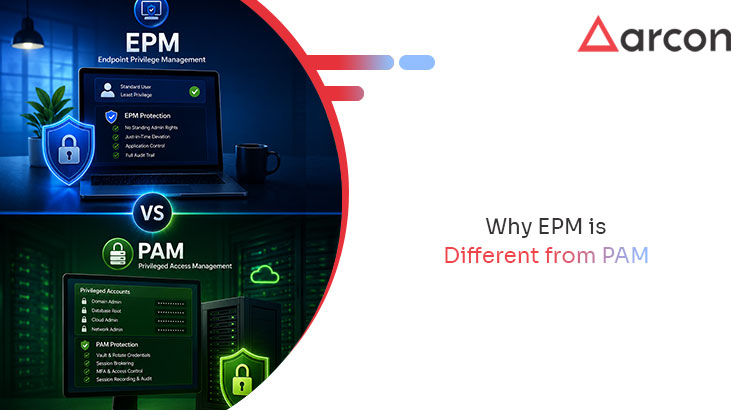
    The cleanest way to hold the two apart: PAM governs access to privileged systems; EPM governs privilege on the endpoint itself.

    Dimension/ Feature EPM PAM
    Primary Object Protected The endpoint and its local Privileged accounts & sessions
    Core Question Answered “What can this user — or attacker — do on this machine?” “Who can reach this critical system, and how?”
    Where it Operates Laptops, workstations, servers — at the device Servers, databases, cloud consoles, network gear — at the account
    Key Mechanism Remove local admin; just-in-time elevation; application control Credential vaulting; session brokering; recording
    Attack Moment it Governs After initial compromise, limits blast radius on the device Access to the crown jewels — prevents misuse of admin accounts
    Primary User Every employee with an endpoint Administrators and privileged operators
    Primary Objective Enforce least privilege on every endpoint Secure and govern privileged access
    Analyst Framing PEDM (Privilege Elevation & Delegation Management) PASM (Privileged Account & Session Management)

    In Gartner’s framing of the privileged access market, PEDM is the endpoint-native, granular-elevation model that EPM delivers, while PASM is the vault-and-broker model at the core of PAM. They are complementary categories, not competing ones.

    Why most enterprises need both

    PAM and EPM defend different stages of the same intrusion. PAM makes the privileged account hard to misuse. EPM makes the endpoint — where the attacker arrives — hard to weaponize. Run PAM alone, and you harden the destination but leave the entry point open. The attacker lands on an endpoint with standing local admin. They disable tooling. They move laterally. They meet your PAM controls late, if at all.

    The attacker does not respect that gap. They exploit it.

    The unmanaged-endpoint problem makes this concrete. In the last year, 46% of devices logging corporate credential artifacts were unmanaged endpoints — BYOD and personal laptops outside central control (Verizon DBIR 2025). PAM does not reach those devices. EPM does.

    The strongest posture runs both as one program. PAM governs privileged accounts and sessions. EPM enforces least privilege at every endpoint. Behavioral analytics reads privilege activity across both. That convergence — not two disconnected tools — is how identity-first security closes the gap between the account and the device.

    Frequently Asked Questions

    What is the difference between EPM and PAM?

    EPM (Endpoint Privilege Management) removes local administrator rights and enforces least privilege on endpoints. It elevates only approved actions, just in time. PAM (Privileged Access Management) secures privileged accounts and sessions through credential vaulting, session brokering, and recording. EPM governs what can happen on a compromised device. PAM governs who can reach sensitive systems.

    Does EPM replace PAM?

    No. They protect different points in an attack. PAM secures the privileged accounts that administer infrastructure; EPM secures the endpoints where most attacks begin. Enterprises typically need both, ideally managed as one program.

    What is PEDM?

    PEDM stands for Privilege Elevation and Delegation Management — granting granular, time-bound privilege elevation for a specific task or application rather than standing administrator rights. It is the core mechanism inside EPM and the analyst term Gartner uses for endpoint-native privilege control.

    Will removing local admin rights stop users from doing their jobs?

    Not if EPM is deployed correctly. Instead of permanent admin rights, users get just-in-time elevation for approved applications, with approval workflows for exceptions and offline elevation for disconnected devices. The goal is least privilege without a productivity penalty.

    Does EPM help with compliance?

    Yes. Removing local admin and enforcing just-in-time elevation maps directly to least-privilege requirements in CIS Controls v8 (Controls 5 and 6), NIST SP 800-207, ISO 27001, and emerging directives such as NIS2 and India’s DPDP Act.

    The bottom line

    PAM and EPM are not alternatives. PAM governs access to your most privileged systems; EPM governs privilege on the endpoints where attackers land first. Treating them as a single identity-first program — with behavioral analytics reading privilege activity across both — closes the gap that a server-only privileged access strategy leaves open.

    Which Compliance Frameworks Require Endpoint Least Privilege? One EPM Solution, Four Mandates

    Four auditors, four frameworks, one recurring finding: users hold admin rights they do not need, and privileged actions go unlogged. NIS2, India’s DPDP Act, ISO 27001, and CIS Controls v8 come from different regulators in different language. They converge on the same control — least privilege on the endpoint, with an audit trail to prove it.

    The good news for anyone juggling overlapping mandates: you do not build four programs. You build one endpoint least privilege program and map its evidence to each framework.

    Key Takeaways

    • Four frameworks, one control. NIS2, DPDP, ISO 27001, and CIS Controls v8 each require least privilege and accountability over privileged access. One EPM solution addresses all four. 
    • The shared requirement is least privilege plus an audit trail. Remove standing admin. Grant access on need. Log every privileged action.
    • CIS Controls 5 and 6 are the operational backbone. They translate the legal language into concrete endpoint controls you can test.
    • The evidence is the same artifact. Elevation logs and application-control policy prove every mandate. You produce them once.
    • Map, don’t multiply. One control set with four evidence mappings beats four parallel compliance efforts.

    Why four frameworks point at the same control

    Regulators rarely prescribe products. They prescribe outcomes. Endpoint least privilege is the operational form of that outcome – which is why such different regimes land on it.

    NIS2 (EU)

    The EU’s NIS2 Directive raises cybersecurity obligations for essential and important entities, with accountability pushed to management. Its baseline measures call for access control and policies on privileged account use. An auditor asks one question: are admin rights restricted to need, and can you show it? Removing standing local admin and governing elevation answers both.

    India’s DPDP Act

    India’s Digital Personal Data Protection Act requires data fiduciaries to apply reasonable security safeguards for personal data. Excess local admin is a direct path to that data. A compromised over-privileged endpoint is exactly the breach the Act targets. Least privilege on endpoints that handle personal data is a concrete, defensible safeguard.

    ISO 27001

    ISO/IEC 27001 is explicit. Its Annex A access-control objectives require restricting access to systems and information. Specific controls address management of privileged access rights. An EPM program removes standing admin, grants elevation on need, and logs it – direct evidence for those controls.

    CIS Controls v8

    The Center for Internet Security’s Controls v8 are the most operational of the four. Control 5 (Account Management) governs the lifecycle and privilege of accounts. Control 6 (Access Control Management) enforces least privilege. Together they translate the legal language of the other three into endpoint actions you can implement and test.

    One program, mapped four ways

    The underlying control is shared. So a single EPM deployment generates evidence for all four mandates. The table maps each capability to what an auditor wants to see.

    EPM capability What it enforces Maps to
    Remove standing local admin Least privilege baseline NIS2 access control · DPDP safeguards · ISO 27001 A.8 · CIS Control 5/6
    Just-in-time elevation + approval workflow Access granted on need, time-bound ISO 27001 privileged access · CIS Control 6 · NIS2 privileged-account policy
    Application control (allow/deny + elevation policy) Only sanctioned software runs with privilege CIS Control 6 · ISO 27001 A.8 · DPDP reasonable safeguards
    | Full elevation audit trail Accountability — who did what, when All four — the evidence layer
    Behavioral analytics on privilege activity Detect anomalous/ abnormal privileged use | NIS2 risk management · ISO 27001 monitoring

    Endpoint least privilege: the evidence auditors ask for

    Mapping controls is half the job. Audits are won or lost on evidence. An endpoint least privilege program should produce, on demand:

    • A current least-privilege state — proof that standing local admin is gone across the estate, with exceptions documented.
    • Elevation records — for any privileged action: which user, which app, when, under what approval, for how long.
    • Application-control policy — the allowlist, the blacklist, and the elevation rules in force, with change history.
    • Anomaly records — where behavioral analytics flagged abnormal privilege use, and what followed.

    These four artifacts answer the recurring questions across NIS2, DPDP, ISO 27001, and CIS. Produce them from one system. The multi-framework audit stops being four projects. It becomes one evidence pull.

    Frequently Asked Questions

    Do NIS2, DPDP, ISO 27001, and CIS Controls all require least privilege?

    Yes — each in its own language. NIS2 calls for access control and privileged-account policies. DPDP requires reasonable security safeguards. ISO 27001 Annex A addresses access control and privileged access rights. CIS Controls 5 and 6 specify account and access management. Endpoint least privilege satisfies the shared requirement.

    Can one EPM program cover multiple compliance frameworks?

    Yes — that is its efficiency. The frameworks converge on least privilege plus an audit trail. So a single EPM program generates evidence mapped to all of them. You implement the control once. You map its artifacts to each mandate.

    What are CIS Controls 5 and 6?

    CIS Control 5 (Account Management) governs the lifecycle and privilege of accounts; Control 6 (Access Control Management) enforces least privilege and manages access rights. Together they are the operational backbone for endpoint least privilege and translate the broader legal mandates into testable actions.

    What audit evidence does an endpoint least privilege program produce?

    A current least-privilege state (standing admin removed), per-action elevation records (user, app, time, approval), the application-control policy in force, and records of anomalous privilege activity. The same artifacts serve every framework.

    Does the DPDP Act specifically require endpoint controls?

    The Act requires reasonable security safeguards for personal data. It does not name specific controls. Least privilege on endpoints that handle personal data — plus logging of privileged access — is a concrete, defensible safeguard. It maps cleanly to that obligation.

    The bottom line

    NIS2, DPDP, ISO 27001, and CIS Controls v8 read as four separate burdens. Operationally they are one: enforce endpoint least privilege and prove it with an audit trail. Build a single EPM program — remove standing admin, grant elevation just in time, control privileged execution, log everything. Now you produce the evidence each auditor wants from one source, not four.