

Key Takeaways
- Run the endpoint privilege agent in audit mode for a full business cycle before enforcing anything. Observed behaviour writes a better policy than a workshop does.
- Capture three baselines in that window: share of users holding standing local admin, elevation events per user per week, and admin-related tickets per 100 users.
- Verizon's 2026 DBIR finds credential abuse at some point in 39 percent of breaches, well above the 13 percent it opens. Standing local admin is what makes the steps after the first host cheap.
- A self-service elevation path faster than a ticket is what protects productivity. Without one, users route around the control or the control gets withdrawn.
Why standing admin rights are still the exposure you control
Verizon's 2026 Data Breach Investigations Report counts credential abuse in 39 percent of breaches when you look at every stage of the intrusion rather than only the way in. Verizon's own wording is that credential abuse "is pervasive across various attack paths and is a legitimate mitigation target chokepoint". Standing local admin is what makes that chokepoint cheap to pass through, and the recurring reasons breaches succeed point the same way.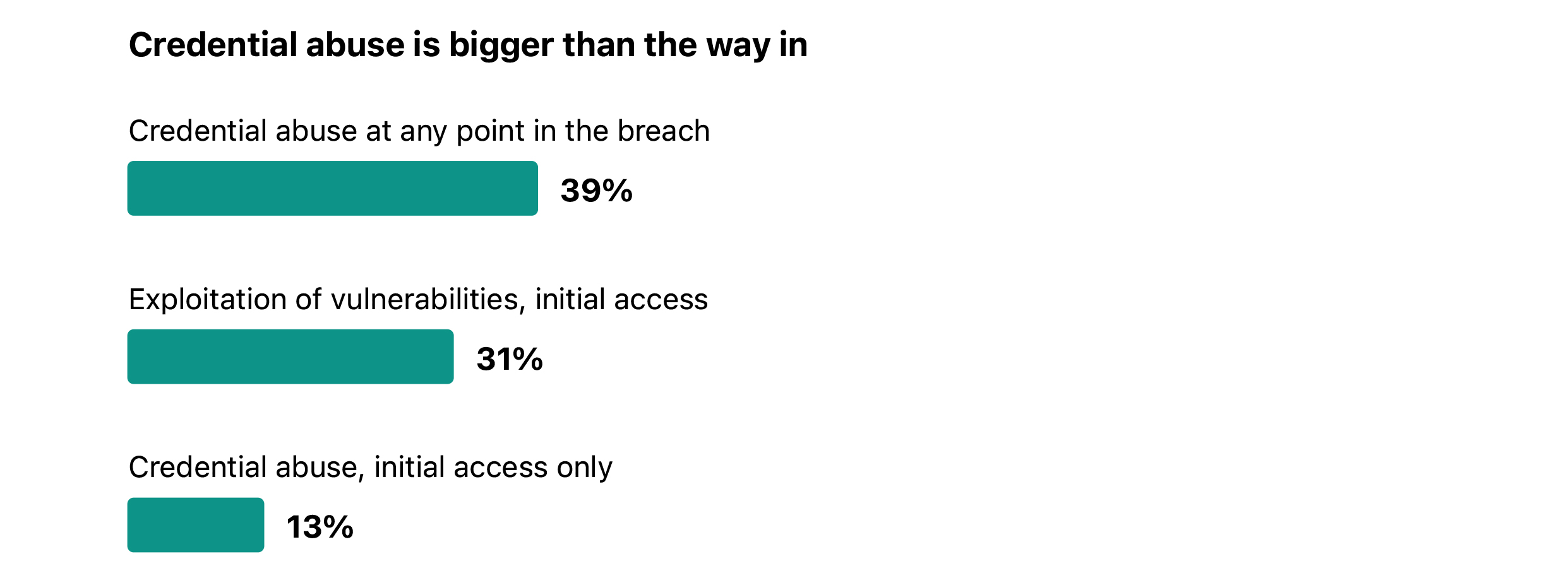 Source: Verizon, 2026 Data Breach Investigations Report. Initial access shares are drawn from nonError, non Misuse breaches (n=20,023). The 39 percent counts credential abuse at any stage of the breach progression.
The mechanism is narrow. Standing local admin means one compromised session already holds the privilege to
disable local defences, install a service, read credentials from memory, and reach the next host. Removing it does
not stop the session being compromised. It removes the step that makes everything after the first host cheap.
Be honest about the boundary. Removing local admin does not stop phishing, valid credentials abused against cloud applications, or a vulnerable internet-facing service. In the 2026 DBIR, exploitation of vulnerabilities is now the leading initial access vector at 31 percent, up from 20 percent, and that share belongs to patching. Credential abuse opens only 13 percent of breaches as the first recorded action, and Verizon notes that number fell partly because it began counting pretexting separately this year. The case for removing standing admin rests on the 39 percent, not the 13.
Source: Verizon, 2026 Data Breach Investigations Report. Initial access shares are drawn from nonError, non Misuse breaches (n=20,023). The 39 percent counts credential abuse at any stage of the breach progression.
The mechanism is narrow. Standing local admin means one compromised session already holds the privilege to
disable local defences, install a service, read credentials from memory, and reach the next host. Removing it does
not stop the session being compromised. It removes the step that makes everything after the first host cheap.
Be honest about the boundary. Removing local admin does not stop phishing, valid credentials abused against cloud applications, or a vulnerable internet-facing service. In the 2026 DBIR, exploitation of vulnerabilities is now the leading initial access vector at 31 percent, up from 20 percent, and that share belongs to patching. Credential abuse opens only 13 percent of breaches as the first recorded action, and Verizon notes that number fell partly because it began counting pretexting separately this year. The case for removing standing admin rests on the 39 percent, not the 13.
Why admin rights removals fail
Three failure modes account for most rolled-back projects. Enforcement before discovery. The policy comes from a stale inventory, so the first wave blocks work nobody knew was privileged. No elevation path faster than a ticket. When a legitimate elevation means a queue measured in hours, the business escalates until the policy is suspended. One policy across unlike populations. Finance, engineering and field sales do not elevate for the same reasons, so a blanket rule is either too tight for engineering or too loose for everyone else. Under all three sits one miss: nobody owned the exception queue, so exceptions became permanent.What actually breaks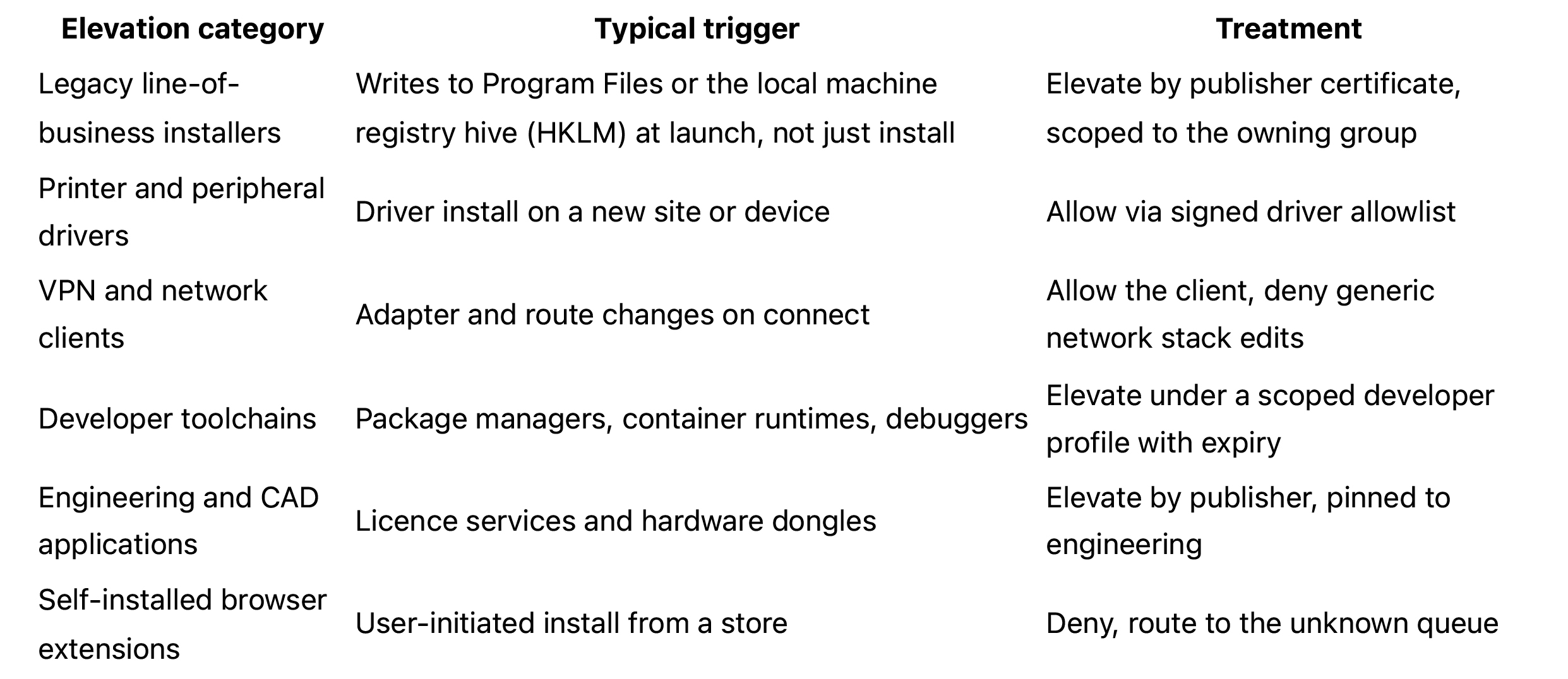
Coverage: macOS, offline laptops and servers
State the boundaries before you commit a date. On Windows the pattern above is complete. On macOS the enforcement primitives differ, so macOS needs its own policy set and pilot, not a translated copy. On offline laptops cached policy keeps enforcing and requests queue, so the user gets allow and deny verdicts but no fresh human approval. Servers are a separate control domain, so scope them apart.Step 1: Run in audit mode first and let behaviour write the policy
Audit mode logs every elevation attempt and blocks nothing. Run it for a full business cycle including month-end, because the finance close is where the unusual elevations live. Two weeks is not a business cycle. Auto profiling turns that log into a central inventory. Read the output in this order, because the order turns raw events into a defensible policy: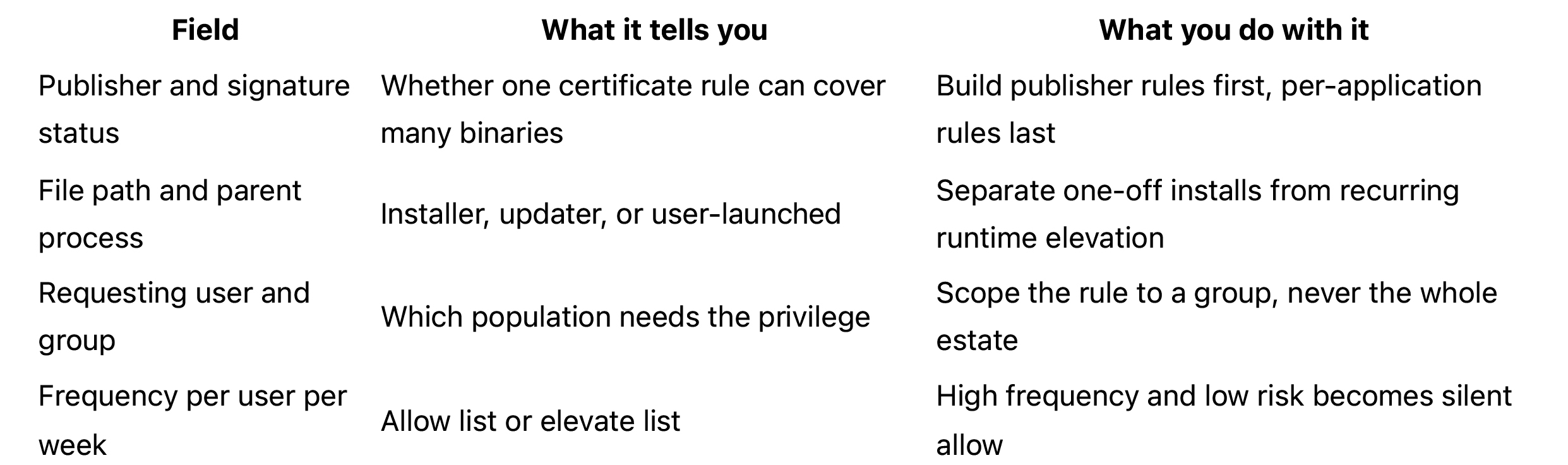 While that window runs, capture three baselines. You get no second clean chance at them:
1. Share of users holding standing local admin, counting local accounts as well as directory-joined ones.
2. Elevation events per user per week.
3. Admin-related helpdesk tickets per 100 users.
Then segment before writing a single rule. Group by line of business and role, and look for populations whose elevation profile is genuinely different, not merely differently named.
While that window runs, capture three baselines. You get no second clean chance at them:
1. Share of users holding standing local admin, counting local accounts as well as directory-joined ones.
2. Elevation events per user per week.
3. Admin-related helpdesk tickets per 100 users.
Then segment before writing a single rule. Group by line of business and role, and look for populations whose elevation profile is genuinely different, not merely differently named.
Step 2: Allow,deny,elevate,and who each rule applies to
Every observed behaviour resolves to one of three verdicts. Allow means the action runs with the privilege it needs and the user sees nothing, as with a signed printer driver from an approved vendor. Elevate means the action is permitted but brokered and logged, on a just-in-time grant that expires, as with a developer starting a local container runtime. Deny means the action is refused and routed somewhere a human can look at it, as with a self-installed browser extension.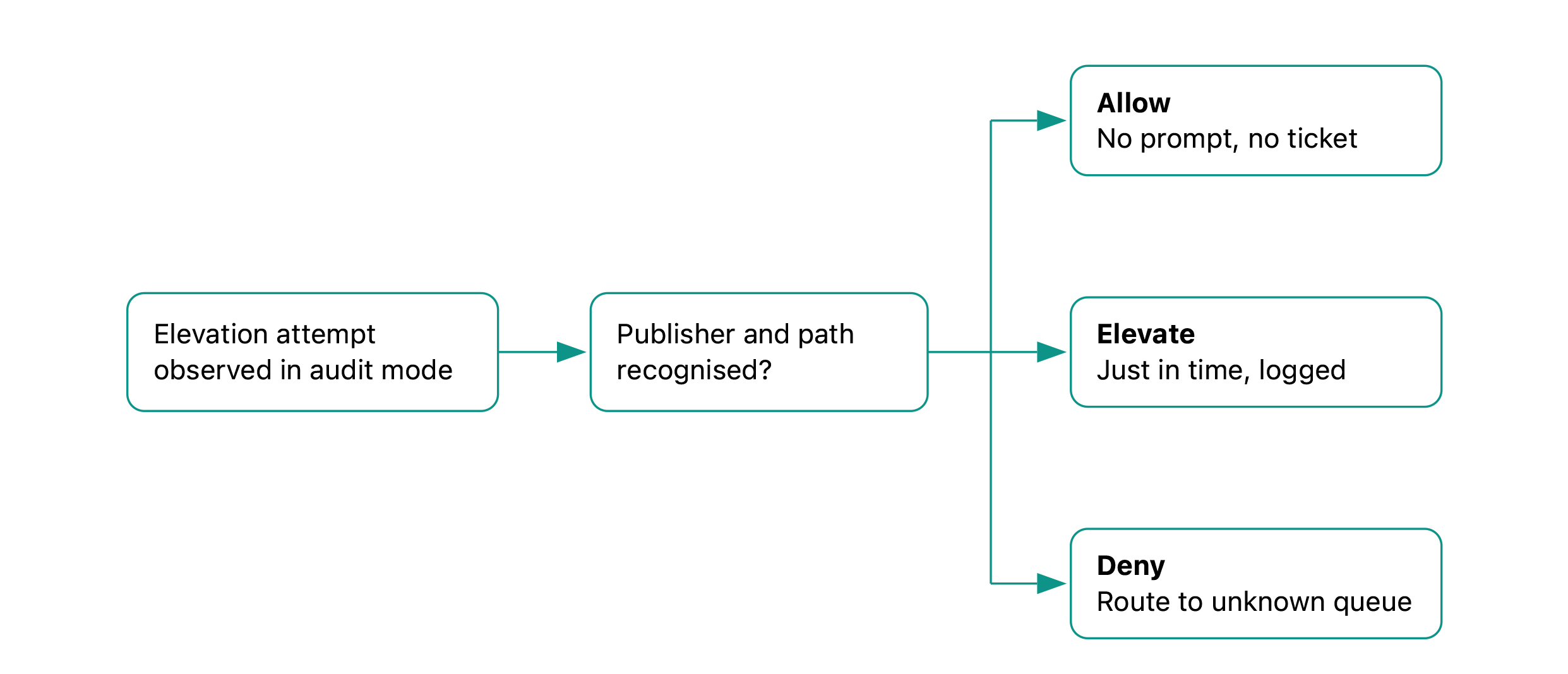 Every elevation observed in Step 1 resolves to one of three verdicts, scoped to a group rather than to the whole estate.
Scope each rule to a group or line of business. The opposite trap is a rule per team, which produces hundreds of policies nobody can audit. Keep the count near the number of genuinely distinct elevation profiles.
Prefer publisher and certificate rules over per-application rules. One certificate rule covers every current and future binary from that vendor. A per-application rule needs maintenance at every version bump, so reserve those for legacy software whose signing is unreliable.
Leave some things deliberately permissive in phase one. Shipping a narrow policy on time and tightening it in phase two is a schedule decision, not a security failure.
Every elevation observed in Step 1 resolves to one of three verdicts, scoped to a group rather than to the whole estate.
Scope each rule to a group or line of business. The opposite trap is a rule per team, which produces hundreds of policies nobody can audit. Keep the count near the number of genuinely distinct elevation profiles.
Prefer publisher and certificate rules over per-application rules. One certificate rule covers every current and future binary from that vendor. A per-application rule needs maintenance at every version bump, so reserve those for legacy software whose signing is unreliable.
Leave some things deliberately permissive in phase one. Shipping a narrow policy on time and tightening it in phase two is a schedule decision, not a security failure.
Step 3: Give users a path fasterthan a ticket
This is the half of the title most projects underbuild. If elevation is slower than the workaround, the workaround wins. Just-in-time self-service elevation should read like this to the user. Right-click and request elevation, pick a reason from a short list, add a line of context, receive the grant, continue working. No ticket number typed by hand, and the grant expires on its own. Design the approval split before you switch it on. Low-risk categories seen repeatedly in audit mode autoapprove. Anything touching security tooling, or from an unrecognised publisher, needs a named human. Publish an approval target you can meet during business hours, and staff it, because a missed target teaches users to stop asking. Write the request and its outcome back to the IT service management (ITSM) system. The audit trail and the helpdesk should read one record, not two that disagree. Then plan the failure modes. Time-boxed break-glass local admin, granted for a fixed window and logged loudly, stops a field engineer being stranded. Decide in advance what happens when the elevation service is unreachable: cached policy keeps enforcing allow and deny, and queued approvals resume on reconnect. Agree the rollback trigger with the business before enforcement day, in writing, with a number attached.Step 4: Handle the unknowns instead of blocking them
Deny-by-default on unknown publishers is correct, and it is also what generates the ticket spike. Every piece of niche, regional or internally built software your inventory missed arrives at the helpdesk that same morning. Sandboxed observation gives that queue somewhere to go. The pattern, sold under several names across the endpoint privilege category, runs the unknown application in an isolated context and records what it writes, what it registers, and what it reaches out to, while the user keeps working. The output supports one decision: allow list, elevate list, or neither. Treat it as a criterion to test during evaluation rather than a given, because isolation depth and what actually gets recorded vary widely. Feed every verdict back into the lists. Done consistently the queue shrinks week over week, because each decision covers a publisher rather than one binary. The honest limit: sandbox observation tells you what an application did during observation, not what it will do under different conditions or after an update. It reduces the unknown queue. It does not replace a software approval process.Step 5: Prove it
Three artefacts carry the evidence, each mapping to a named control.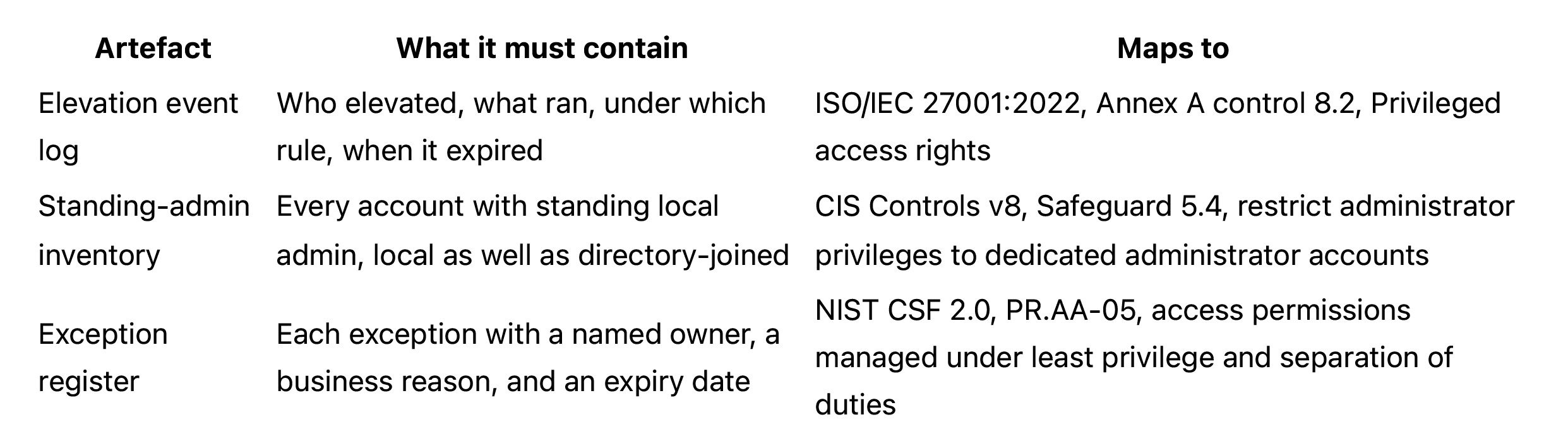 Set a cadence that survives contact with reality: an operational review monthly, a risk committee summary quarterly. Anything more frequent stops happening by month four.
Agree the export columns with the auditor before the first review, not after. The elevation log needs timestamp, user, host, process and command line, the rule that matched, the approver where one was involved, and the expiry. The standing-admin inventory needs account, host, how the privilege was granted, and the date last reviewed. The exception register needs owner, business reason, compensating control and expiry.
Export in a format an auditor can approve rather than rebuild. A dated, filterable export tied to the control reference beats a screenshot pasted into a slide, and it decides whether the auditor confirms your evidence or reconstructs it.
Set a cadence that survives contact with reality: an operational review monthly, a risk committee summary quarterly. Anything more frequent stops happening by month four.
Agree the export columns with the auditor before the first review, not after. The elevation log needs timestamp, user, host, process and command line, the rule that matched, the approver where one was involved, and the expiry. The standing-admin inventory needs account, host, how the privilege was granted, and the date last reviewed. The exception register needs owner, business reason, compensating control and expiry.
Export in a format an auditor can approve rather than rebuild. A dated, filterable export tied to the control reference beats a screenshot pasted into a slide, and it decides whether the auditor confirms your evidence or reconstructs it.
Rollout timeline and the numbers you report upward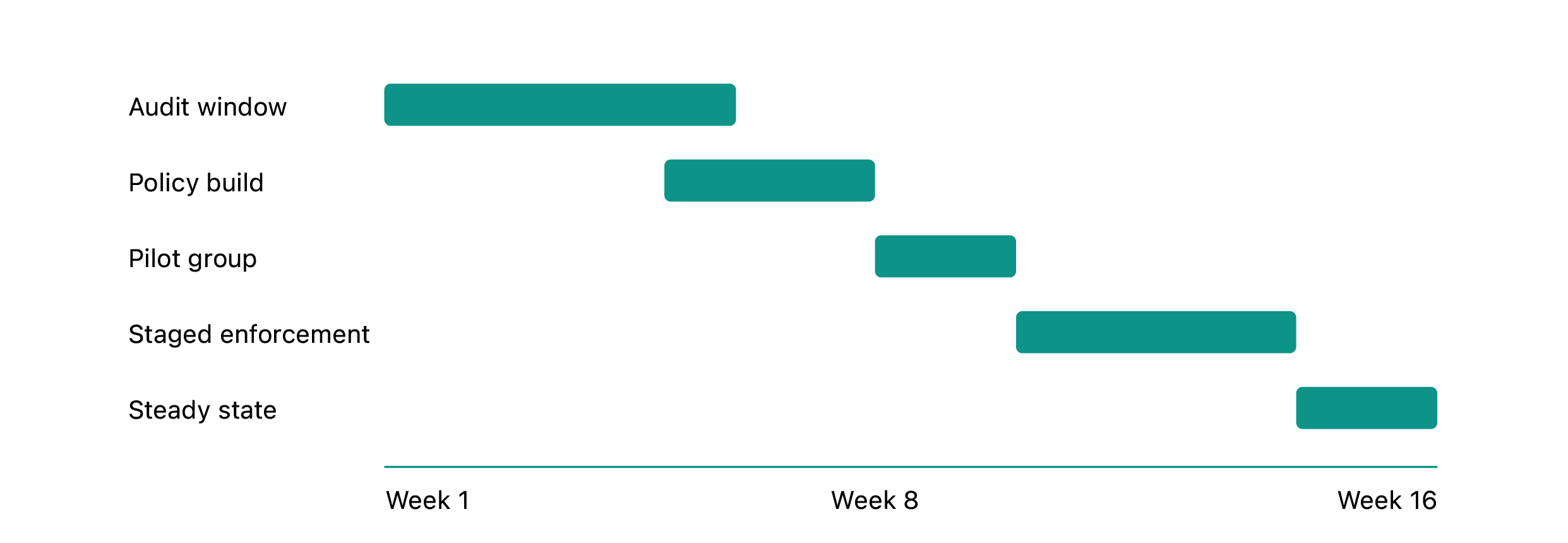
A phased sequence with named gates. Each phase starts only when the previous one has produced its artefact.
The gates matter more than the dates. Audit ends when you hold the three baselines. Policy build ends when every rule is scoped to a group. The pilot covers one willing line of business. Enforcement takes one population at a time. Steady state begins when the exception register has an owner and a review date.
Three numbers go upward, each with a Step 1 baseline and a target set at kickoff:
- Share of users with standing local admin. Target zero outside the exception register.
- Elevation approval time against target. Pick a target you can defend, say fifteen minutes during business hours, and report the miss rate, not the average.
- Admin-related tickets per 100 users. Reported monthly against the audit-window baseline.
About the author
ARCON (ARCON TechSolutions Pvt. Ltd.) builds privileged access management and endpoint privilege management technology for regulated enterprises across banking and financial services, healthcare, manufacturing, government and energy. This piece was written by the ARCON editorial team for the infrastructure and identity teams who run these rollouts. Company profile: ARCON on LinkedIn. Not sure of your three baseline numbers yet? A privilege exposure assessment produces them without touching enforcement. Talk to the team. Sources- Verizon, 2026 Data Breach Investigations Report (2026), Figures 10 and 11 and the Results and analysis section: report
- ISO/IEC 27001:2022, Annex A 8.2 Privileged access rights: standard
- CIS Controls v8, Safeguard 5.4: controls
- NIST, Cybersecurity Framework 2.0, PR.AA-05: CSWP 29