

Key Takeaways
- Just-in-time (JIT) elevation replaces standing admin rights with administrator privilege that exists only while a task runs.
- Zero standing privilege means no account on the endpoint holds administrator rights while no task is running.
- These deployments fail for one reason above all others: when the approved path is slower than the workaround, the workaround wins.
- This post covers endpoints and workstations. It does not cover servers, domain controllers, or cloud consoles.
- Time-bound elevation still leaves a privileged identity in place between uses. An ephemeral account does not.
Why the just-in-time elevation project stalls between intent and reality
Open the local Administrators group on ten of your endpoints. Count the named members. Then count how many were added for something that was supposed to last an afternoon. That number is the real distance between justin-time elevation and standing admin rights in your estate, and no vendor survey can tell it to you. Most teams find two categories: the members they expected, and a longer tail nobody can explain. It is tempting to justify the work with a credential-theft statistic. The current numbers do not support that framing. The Verizon Data Breach Investigations Report 2026 puts vulnerability exploitation first among known initial access vectors, at 31 percent of the breaches it counts. Credential abuse, the previous leader, accounts for 13 percent (Verizon DBIR 2026, reported by Infosecurity Magazine, 2026). That is the better argument, not a weaker one. If the way in is now an unpatched service rather than a stolen password, the control that matters is what the intruder inherits on arrival. On most endpoints, what they inherit is a standing local administrator token. JIT elevation removes that token. Deployments stall in three predictable places: approval takes longer than the workaround, some applications refuse to start without administrator rights, and nobody owns deprovisioning once the pilot ends. JIT is not one control. It is four mechanisms that have to hold together, and this post covers endpoints and workstations only. Each mechanism is below, in the order that decides whether the project survives contact with users.What standing admin rights actually mean on an endpoint
Standing privilege is any administrator right that exists while no task is running. On a Windows endpoint it takes four common forms.- A named user sitting in the local Administrators group.
- A domain group nested into local Administrators, which hides the real membership behind a directory lookup.
- Permanent elevation granted by policy, where the account is not a member but the rights arrive anyway.
- A shared local administrator account with a common password across the fleet.
Making approval fasterthan the workaround
Here is the governing rule for the whole project. If a legitimate request takes longer than the workaround, the workaround wins. Standing admin rights are the workaround. Every minute you add to the approval path is an argument for keeping them. Reduce the latency in this order.- Policy-based auto-approval for pre-classified low-risk actions. A signed printer driver from an approved publisher does not need a person. Decide the risk class once, in a rule, and the request resolves in seconds.
- Multi-level approval reserved for high-risk classes only. Two approvers on a kernel driver install is proportionate. Two approvers on every request teaches users to route around you.
- Integration with the ticketing system the team already lives in. A request that never leaves that workflow is a request nobody has to be trained on.
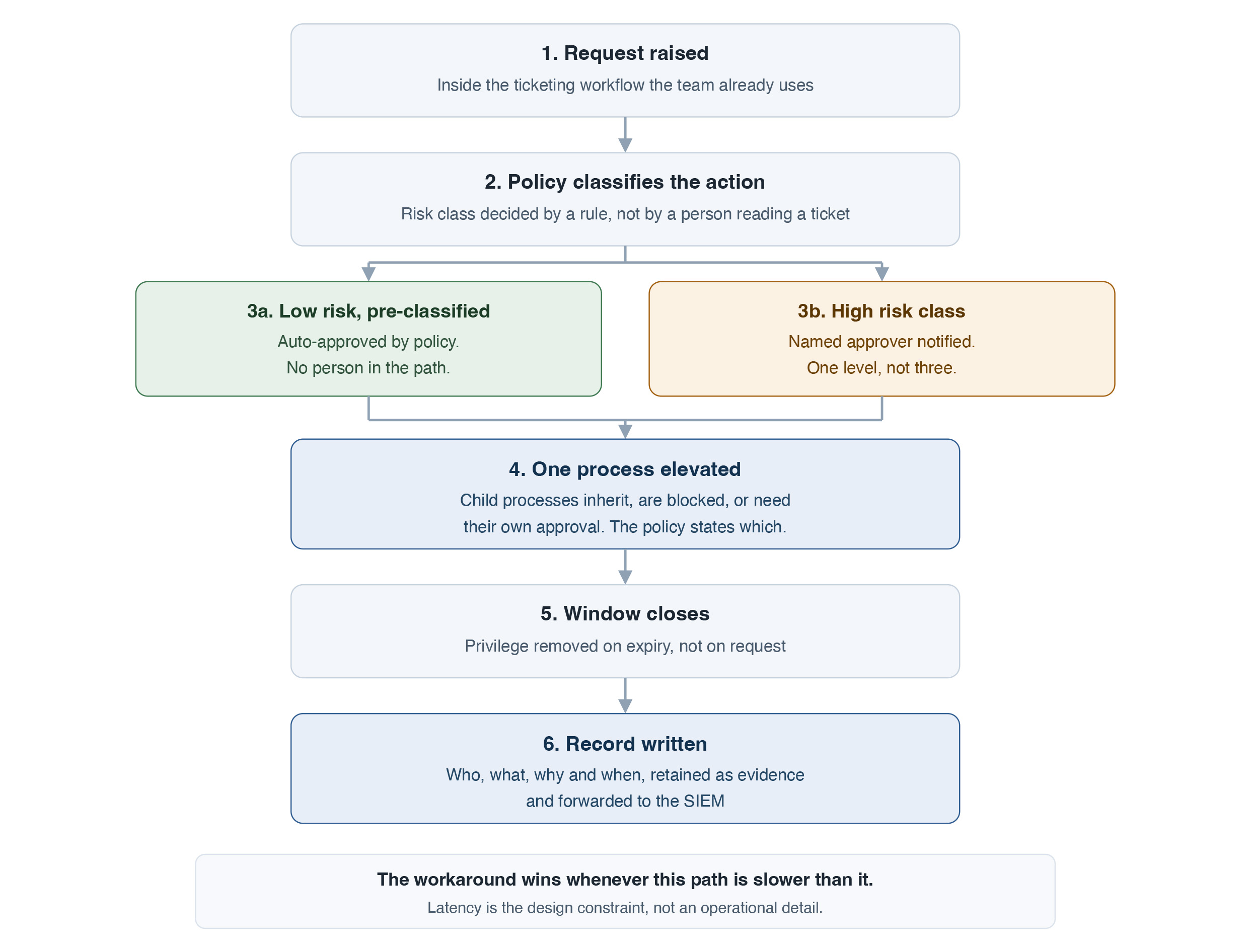 The lifecycle of a single elevation request, from the ticket the user already had open to the record an auditor later reads. Stage 3 is where most of the elapsed time is won or lost.
What breaks on day one, and how to sequence around it:
The lifecycle of a single elevation request, from the ticket the user already had open to the record an auditor later reads. Stage 3 is where most of the elapsed time is won or lost.
What breaks on day one, and how to sequence around it:
- Legacy applications that demand administrator rights at launch. Inventory them before you remove
- anything, then put each one behind a rule that elevates the application, not the user.
- Driver and peripheral installs. These are frequent, low risk, and the fastest win available to auto-approval.
- Developer workstations. Build tooling, debuggers, and container runtimes raise elevation requests that a general office policy will not match. Treat them as their own policy set.
- Laptops that are off the corporate network when the request is made. Decide the offline behaviour before rollout, not during it.
Fourjust-in-time patterns and when to use each
Four patterns cover almost every request you will see. They are not tiers, and they are not a maturity sequence. Each suits a different shape of task.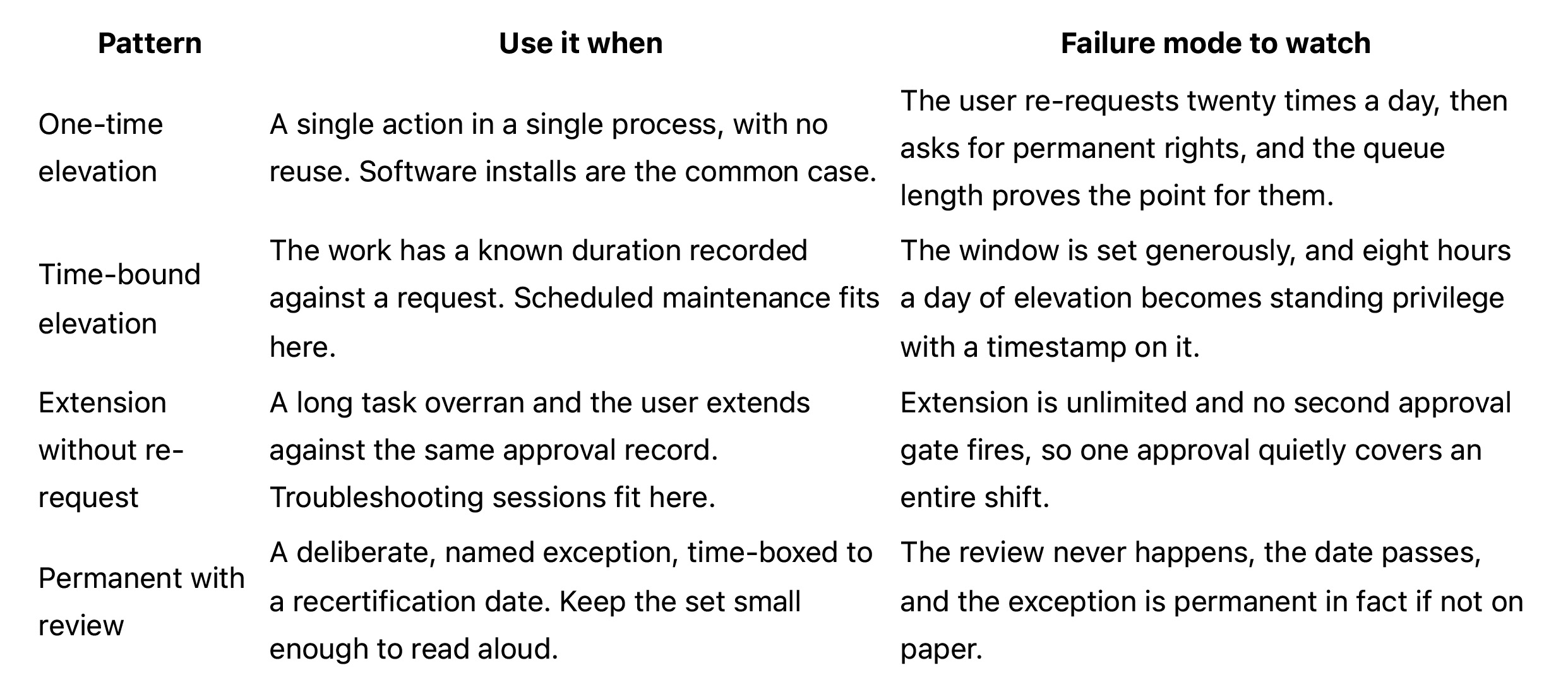 Two of these carry most of the volume. One-time elevation handles the installs. Time-bound handles the planned work. Extension exists so a real task does not push a user back into the queue mid-incident. Permanent with review exists so the exceptions stay visible instead of going underground.
The selection rule is one sentence. Choose by task duration and predictability, not by seniority. A senior engineer installing one signed package needs one-time elevation. A junior administrator running a four-hour migration needs a bounded window. Grade the task, never the person, or the pattern set turns into a rank chart and the exceptions follow the org chart.
Two of these carry most of the volume. One-time elevation handles the installs. Time-bound handles the planned work. Extension exists so a real task does not push a user back into the queue mid-incident. Permanent with review exists so the exceptions stay visible instead of going underground.
The selection rule is one sentence. Choose by task duration and predictability, not by seniority. A senior engineer installing one signed package needs one-time elevation. A junior administrator running a four-hour migration needs a bounded window. Grade the task, never the person, or the pattern set turns into a rank chart and the exceptions follow the org chart.
Ephemeral admin accounts: nothing persists to be stolen
Time-bound elevation and an ephemeral admin account look similar from the ticket queue. They are not the same control. Time-bound elevation leaves a privileged identity in place between uses. The account exists, its rights are dormant, and its credential can still be recovered from the machine. An ephemeral account does not exist before the task and does not exist after it. It is created for the work and removed when the work ends. What changes for an attacker is specific. Credential-harvesting tooling run against an endpoint at rest finds no privileged local credential to take, because there is no privileged local account holding one. The hard parts sit in the lifecycle, and an honest account of this pattern covers them.- Ownership left behind. Files and registry keys created during the task belong to an account that no longer exists. Decide the ownership target in advance, or you inherit orphaned access control entries on every machine.
- The endpoint is offline at the wrong moment. Define the queued behaviour for creation and deletion, and define what happens if the machine never reconnects.
- Deletion fails sometimes. A reconciliation job that finds and removes surviving accounts is not optional. Its output is the only real proof the pattern is holding.
Parent-child process control: elevation that does not leak
Here is the chain that quietly voids a JIT deployment. A user requests elevation to run an installer. The installer is elevated and runs. The installer spawns a command shell. The shell inherits the elevation token. The user then launches a browser from that shell, and the browser inherits it too. Nothing in that sequence was approved except the installer. The elevation was scoped to one task and now covers whatever the user starts next, for as long as the shell stays open. Every control described so far still shows a clean record, because the request, the approval, and the expiry all behaved exactly as designed. The control is to elevate the process, not the session. The policy names the executable, and it states explicitly what happens to child processes. There are three defensible answers. The wrong one is having no answer at all.- Children inherit, which is appropriate for an installer that legitimately spawns its own helpers.
- Children are blocked, which is the safe default for anything a user can launch interactively.
- Children require their own approval, which suits a small set of known chains.
What the auditor sees
An auditor does not ask whether you deployed JIT. They ask which control it satisfies and what evidence it produces. A working elevation workflow produces four artefacts.- The request and approval record, showing who asked, who approved, and against which risk class.
- The elevation event log, showing who elevated, what was elevated, and why.
- Session screen capture for the high-risk classes only.
- Events forwarded to the security information and event management (SIEM) platform, so elevation is visible next to everything else.
What just-in-time elevation does not fix
Four things sit outside this control. A deployment that pretends otherwise fails its first serious review.- Break-glass access. One path has to survive a broken approval service, a directory outage, or a network partition. That account is not eliminated. It is vaulted, its checkout is alarmed, and its use triggers a review by default rather than on request. Rotate its credential after every checkout, and name the person who reads the alarm. An alarm nobody owns is not a control.
- Services, scheduled tasks, and installers already running under privileged local identities. These are configured, not requested. Removing local administrator rights from people does not remove them, and no user-facing elevation workflow touches them. They need their own inventory and their own owner.
- Non-human and machine identities. Service accounts, API keys, and automation credentials have a different lifecycle and a different control problem. Endpoint elevation is the wrong tool for them. Where identity security is heading over the next few years covers that ground.
- The endpoint that is offline when the request is made. Cached approval with a short ceiling, deny by default, or a local break-glass path are all defensible answers. Silence is not. Decide before rollout, because the field engineer on a customer site will decide for you otherwise.
The maturity ladder: where you actually are
Adjectives do not locate you. Counts do. Each rung below is a number you can produce this week.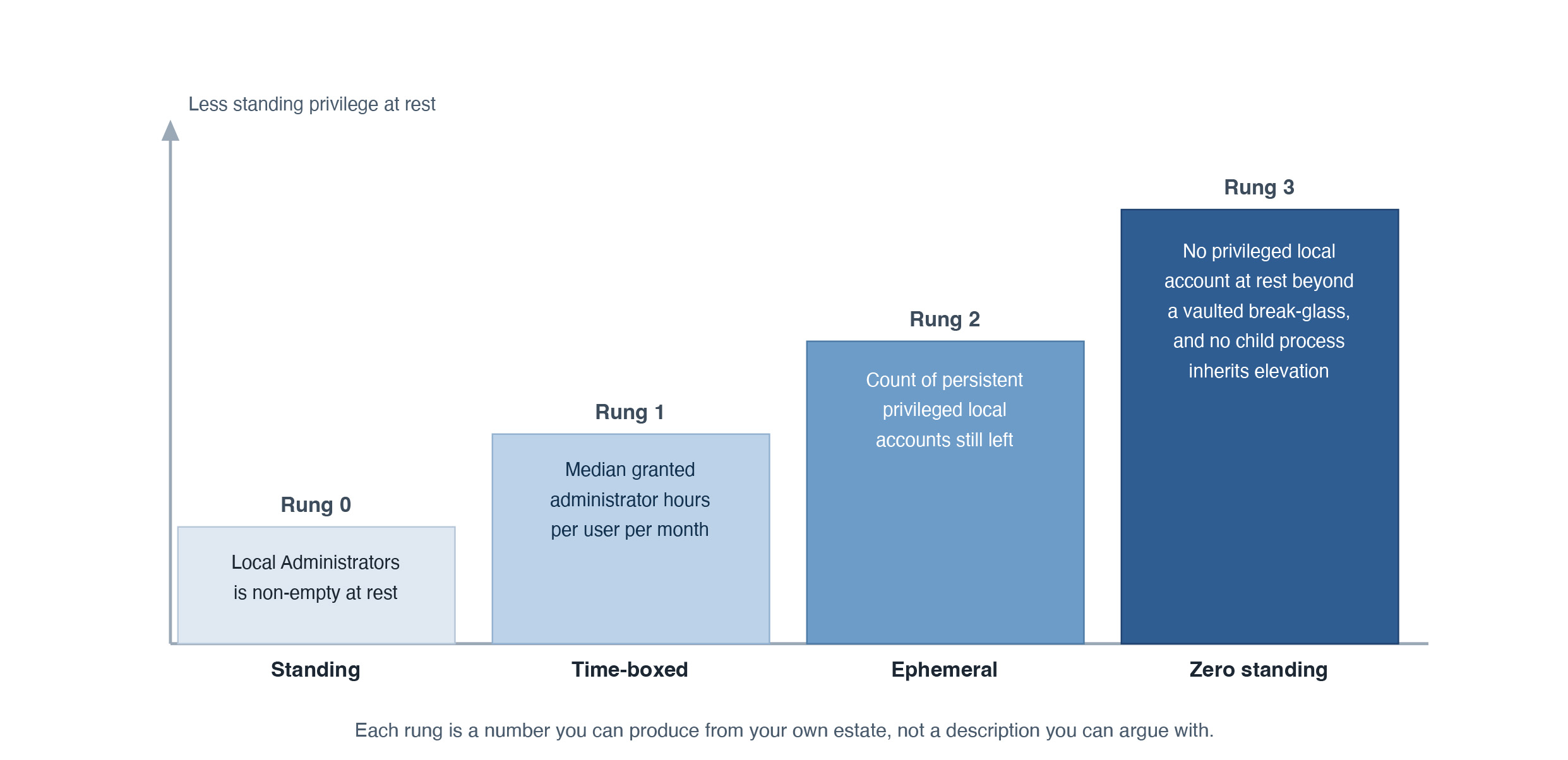 The four rungs of endpoint privilege maturity, each stated as a countable test rather than an adjective. Produce the number for your estate before deciding which rung to build next.
- Rung 0, standing. Named users hold persistent membership in local Administrators. Count the endpoints where that membership is non-empty at rest.
- Rung 1, time-boxed. Every elevation is bounded by a window tied to a request record. Measure the median granted administrator hours per user per month.
- Rung 2, ephemeral. The privileged identity is created per task and removed after it. Count the persistent privileged local accounts still in place.
- Rung 3, zero standing. A scan at rest finds no privileged local account beyond a vaulted break-glass identity, and no child process inherits elevation.
- Verizon, 2026 Data Breach Investigations Report, 2026. Figures for initial access vectors as reported by Infosecurity Magazine, 2026, and CSO Online, 2026.
- Help Net Security, coverage of the 2026 Data Breach Investigations Report, 2026.
- Center for Internet Security, CIS Critical Security Controls Version 8.1, Safeguard 5.4, and the CIS Controls Assessment Specification for Control 5, v8.1, 2024.
- National Institute of Standards and Technology, SP 800-53 Rev. 5, Security and Privacy Controls for Information Systems and Organizations, 2020, and SP 800-53B, Control Baselines, 2020.
- International Organization for Standardization, ISO/IEC 27001:2022, Annex A control 8.2, "Privileged access rights". Paywalled standard, paraphrased here rather than quoted.
- Cybersecurity and Infrastructure Security Agency and National Security Agency, AA23-278A, NSA and CISA Red and Blue Teams Share Top Ten Cybersecurity Misconfigurations, 2023.
- Article 29 Data Protection Working Party, Opinion 2/2017 on data processing at work (WP249), 2017.
- Federal Ministry of Justice, Germany, Works Constitution Act (Betriebsverfassungsgesetz), section 87(1) no. 6, official English translation, as amended 19 July 2024.
- Hero image: "Velocity Micro 'ProMagix HD60' Workstation Computer" by Mnicolois, licensed CC BY, via Wikimedia Commons.